
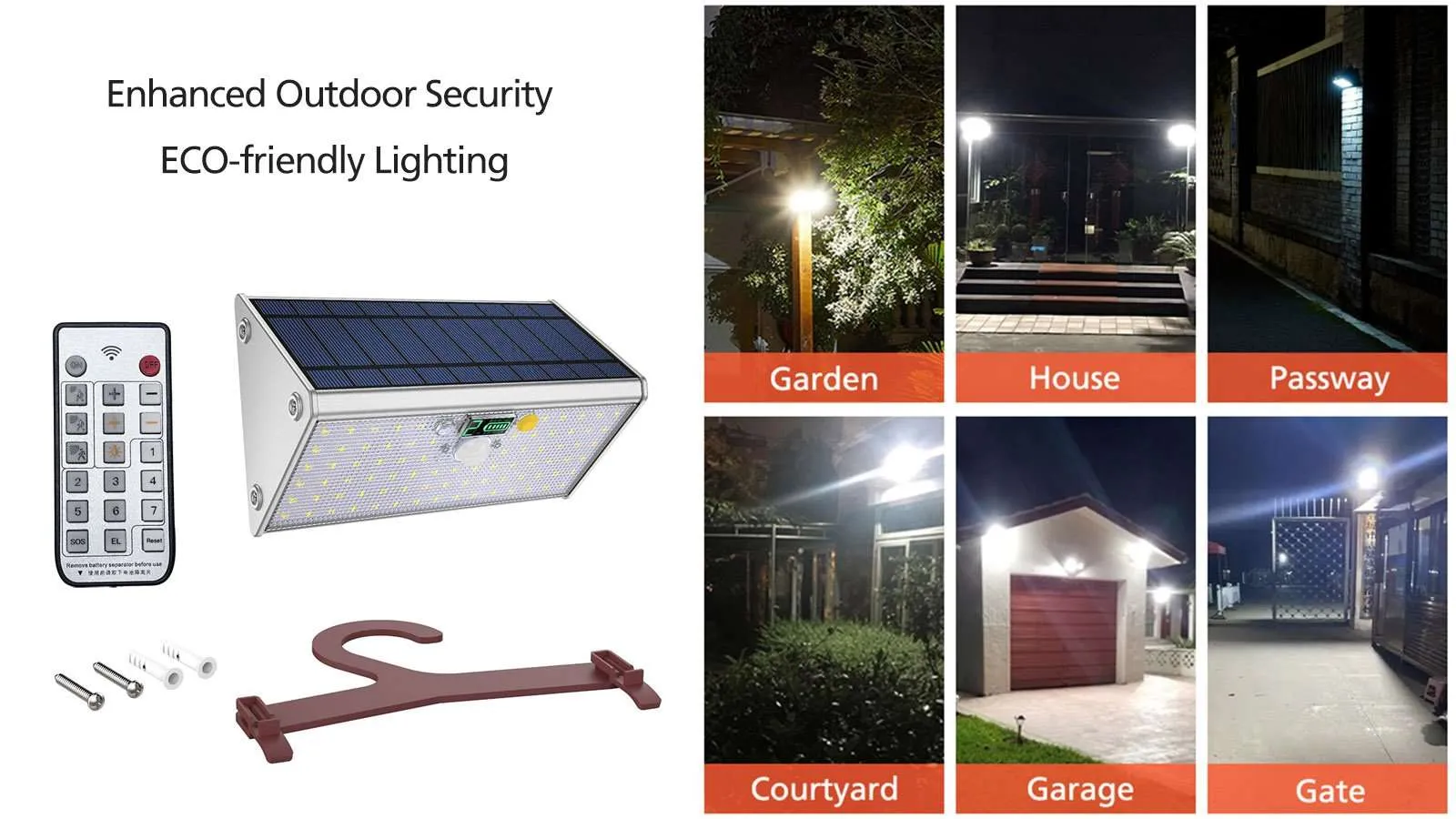
Introduction to Solar Motion Lights
Solar motion lights are an innovative, eco-friendly lighting solution for outdoor spaces. Harnessing solar energy, they charge during the day and automatically illuminate in response to motion at night. This makes them ideal for security and convenience, eliminating the need for electrical wiring and reducing energy costs. Their ease of installation and low maintenance requirements add to their appeal.
Preparing for Installation
When preparing to install the CLL-AL-79/280 solar motion light, consider the following streamlined steps, reflecting the features and requirements as per the user manual:
- Location Selection: Choose a spot with ample sunlight exposure for the built-in solar module. Avoid locations where the solar panel may be obstructed, ensuring efficient charging.
- Tools Required: Minimal tools are needed since the product is designed for easy installation. A drill and screwdriver may be required for mounting the light.
- Safety Measures: Although the installation is straightforward, always ensure ladder safety if height is involved. Wear appropriate protective gear, like gloves, to handle the light fixture safely.
- Mounting Preparation: Use the provided positioning strip to mark where the light will be installed. Ensure the solar module faces in a direction to receive maximum sunlight.
- IP65 Weatherproof Rating: The light’s IP65 rating ensures it is suitable for all weather conditions. No additional protection from water is necessary.
- Vertical Installation: For optimal waterproofing and performance, mount the light vertically as recommended.
- Avoiding Physical Damage: Handle the light carefully during installation to prevent damage. Avoid installing it upside down or at an angle that could compromise its effectiveness.
Tips for Optimal Performance
- Maximize Sunlight Exposure: Regularly check that the solar panel is not shaded and receives maximum sunlight throughout the day.
- Regular Cleaning: Keep the solar panel clean from dust and debris to maintain efficient charging.
- Sensor Adjustments: Position the motion sensor towards the area you want to monitor, adjusting its sensitivity if necessary.
- Avoid Obstructions: Ensure the motion sensor’s field of view is not obstructed by objects like trees or walls.
- Regular Inspections: Periodically inspect the light for any signs of damage or wear.
- Battery Maintenance: Although the solar light is designed to be low-maintenance, occasionally check the battery, especially after extended periods of cloudy weather.
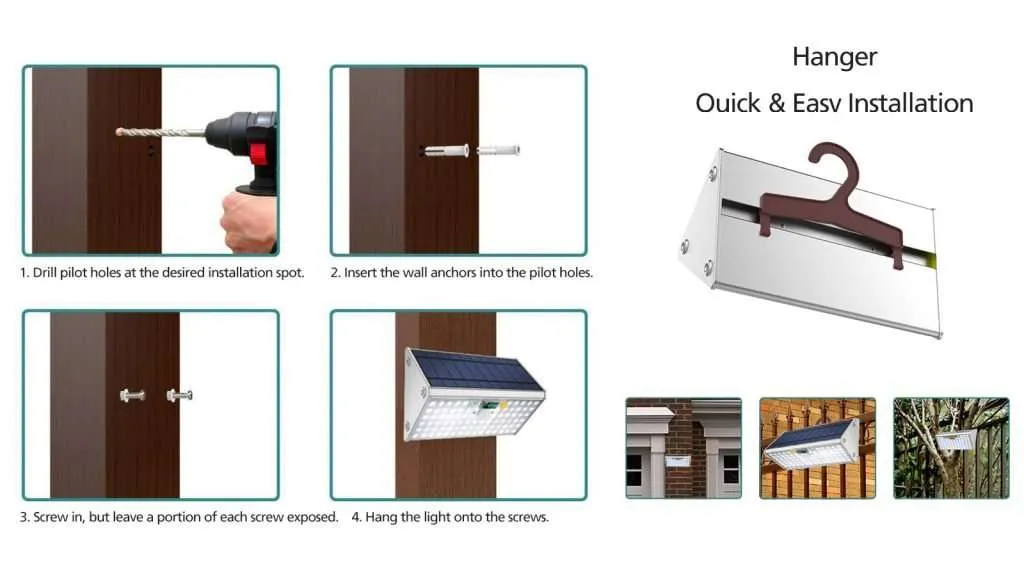
Install Solar Motion Lights, Solar Powered Outdoor Lights
Step-by-Step Installation Guide
- Select the Installation Spot: Choose a location with good sunlight exposure for effective charging of the built-in solar panel.
- Mark the Position: Use the provided positioning strip or a pencil to mark where the light will be installed. Ensure it’s placed for optimal sun exposure and motion detection coverage.
- Drill Mounting Holes: If necessary, drill holes at the marked spots for mounting.
- Mount the Light: Secure the light fixture to the wall using screws. Ensure it’s mounted vertically for optimal performance and waterproofing.
- Adjust the Angle: Position the solar panel and light for maximum efficiency. The solar panel should face the sun, and the light should cover the desired area.
- Check and Activate: After mounting, check that the light is secure. Activate the light according to the instructions, usually by removing a protective tab or switching it on.
- Test the Light: Test the light functionality, ensuring the motion sensor activates the light as expected.
- Final Adjustments: Make any final adjustments to the positioning or settings to optimize performance.
This guide provides a basic framework for installation, and it’s important to refer to the specific instructions in the user manual for detailed steps and safety guidelines.
Troubleshooting Common Issues
- Light Not Turning On: Check to ensure the light is switched on. If new, remove any protective tab from the battery.
- Dim Light: Ensure the solar panel is getting enough sunlight during the day. Clean the panel to remove any dirt or debris.
- Motion Sensor Not Working: Adjust the sensor’s sensitivity or reposition it to better detect movement. Ensure there are no obstructions in its path.
- Light Stays On: Reset the light by turning it off and then on again. Check if the sensor is directly exposed to sunlight, causing it to misinterpret daylight as motion.
- Battery Issues: In case of battery problems, refer to the manual for guidance on battery replacement or maintenance.
Conclusion
Installing the CLL-AL-79/280 solar motion light is a straightforward process that enhances outdoor security and ambiance. By carefully selecting the installation spot, ensuring the solar panel receives ample sunlight, and correctly positioning the motion sensor, you can maximize the efficiency of your solar light. Regular maintenance, such as cleaning the solar panel and checking the battery, will prolong its life. Addressing common issues promptly will ensure continuous, optimal performance. With these simple steps, your solar motion light will be an effective, eco-friendly addition to your outdoor space.
FAQs
How long does the battery last in the CLL-AL-79/280 solar light?
The battery life varies depending on sunlight exposure and usage, but typically, it lasts for several years.
Can I install this solar light myself?
Yes, the installation is designed to be user-friendly and can be done without professional help.
What should I do if the light isn’t charging properly?
Ensure the solar panel is not shaded and clean it regularly. If the issue persists, the battery may need replacing.
Is the CLL-AL-79/280 solar light weather-resistant?
Yes, it has an IP65 rating, making it suitable for all weather conditions.
Can I adjust the brightness of the light?
Yes, the brightness of the CLL-AL-79/280 can be adjusted using the provided remote control.


 English
  Español
  Français
  Deutsch
  Русский
  العربية